
Security
• 4 min read
• Published 2026-09-25
EpsonNet Config Admin Password Reset & Default Credentials Guide
When attempting to transmit new IP parameters or change Wi-Fi settings in EpsonNet Config, users frequently encounter an authentication modal demanding an Administrator Password. If the password was set by a previous technician or is unknown out of the box, configuration cannot proceed without authentication.
Understanding Epson Default Passwords by Manufacturing Date
Seiko Epson altered its security scheme between older legacy devices and modern models:
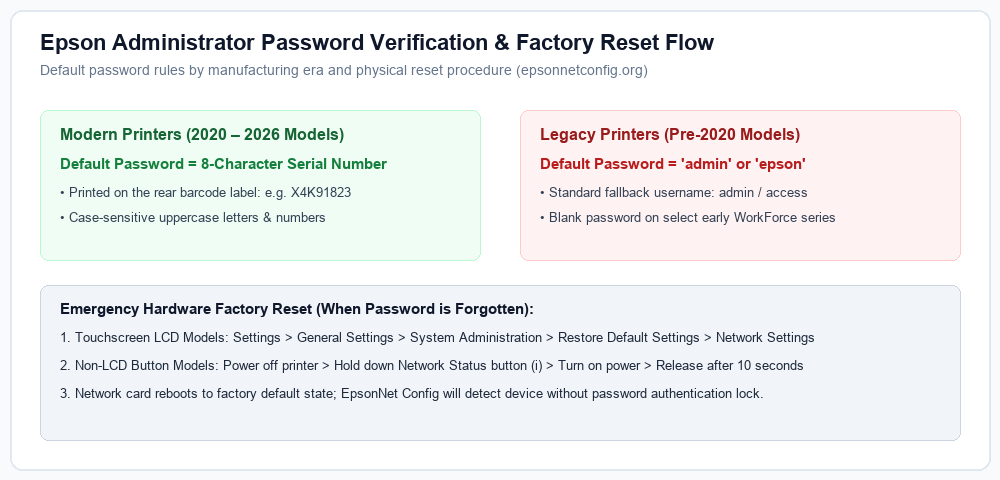
- Models Manufactured After 2020: To comply with modern IoT security laws (such as California SB-327), newer printers feature a unique factory password matching the 8-character Device Serial Number printed on the barcode sticker located on the printer's rear or under the scanner unit.
- Models Manufactured Before 2020: Older hardware often defaults to standard administrative strings:
adminorepson. Select older models allowed a blank password with usernameadmin.
How to Reset a Forgotten Password via Hardware Panel
If a custom administrator password was set and forgotten, you must wipe the network controller back to factory settings:
- For Touchscreen / LCD Models:
- Navigate to Settings > General Settings > System Administration.
- Scroll down and tap Restore Default Settings.
- Select Network Settings and confirm. The printer network interface will restart, wiping all custom passwords.
- For Button-Only Models (EcoTank L3150 / ET-2720 / etc.):
- Turn the printer completely off.
- Press and hold down the Network Status (i) button, then press the Power button simultaneously.
- Keep holding the network button until the Wi-Fi status lights begin flashing alternately.
- Release both buttons. The network card will reset to factory default, and default serial number authentication will be re-established.
Need EpsonNet Config Software?
Download the authenticated v4.9.5 for Windows and v4.9.8 for macOS directly from our official download table with complete checksum hashes.
Go to Official Downloads →