
EpsonNet Config vs. Epson WebConfig: In-Depth Comparison
IT technicians configuring Seiko Epson network peripherals frequently encounter two separate tools: the desktop application EpsonNet Config and the browser-based dashboard Epson WebConfig. While both configure network parameters, their technical architecture and deployment purposes differ substantially.
Architectural Comparison: OSI Layer & Transport Mechanism
The defining technical divergence lies in the network OSI layer at which each utility operates:
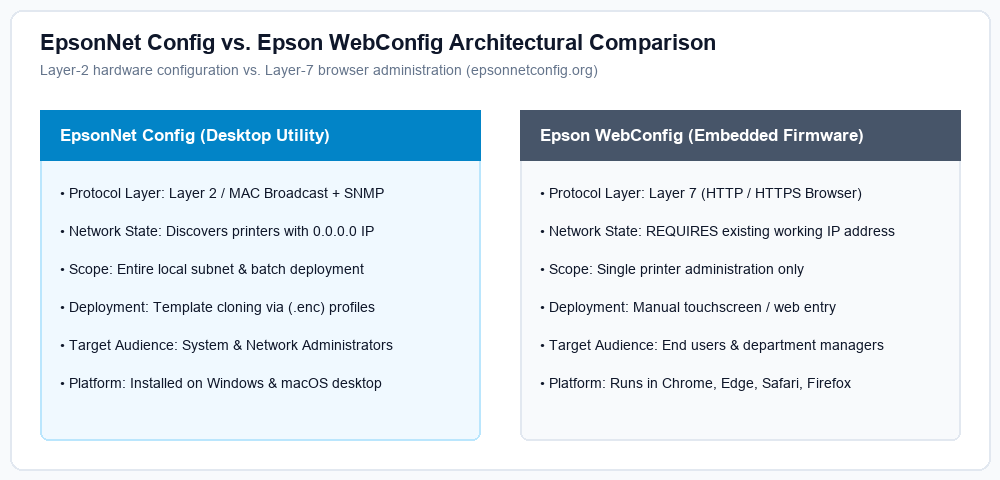
- EpsonNet Config operates at OSI Layer 2 (Data Link) and Layer 3/4 (UDP). It emits raw broadcast frames carrying hardware MAC queries. This unique capability enables it to discover and configure a brand-new printer fresh out of the box with an unassigned
0.0.0.0IP or an incorrect subnet address. - Epson WebConfig operates at OSI Layer 7 (Application) over HTTP (port 80) and HTTPS (port 443). It is hosted internally on the printer's lightweight HTTP daemon. To access it, the printer must already possess a valid, routable IP address reachable by your web browser.
Feature Matrix Summary
| Capability | EpsonNet Config (Desktop) | Epson WebConfig (Browser) |
|---|---|---|
| Find Device with 0.0.0.0 IP | Yes (Layer-2 MAC) | No (Requires IP) |
| Batch Multi-Printer Cloning | Yes (.enc profiles) | No (Single Device) |
| No Software Install Needed | No (Requires App) | Yes (Any Browser) |
| Print Head Cleaning & Ink Levels | Network Info Only | Yes (Maintenance Tools) |
When Should You Use Each?
Use EpsonNet Config when: setting up multiple printers on an enterprise campus, deploying fixed IP templates, configuring devices located on foreign subnets, or restoring connectivity after network renumbering.
Use WebConfig when: modifying scan-to-cloud email destinations, reviewing ink usage logs, updating printer firmware over the air, or managing a single printer from a smartphone, iPad, or Chromebook.
Need EpsonNet Config Software?
Download the authenticated v4.9.5 for Windows and v4.9.8 for macOS directly from our official download table with complete checksum hashes.
Go to Official Downloads →